Overview
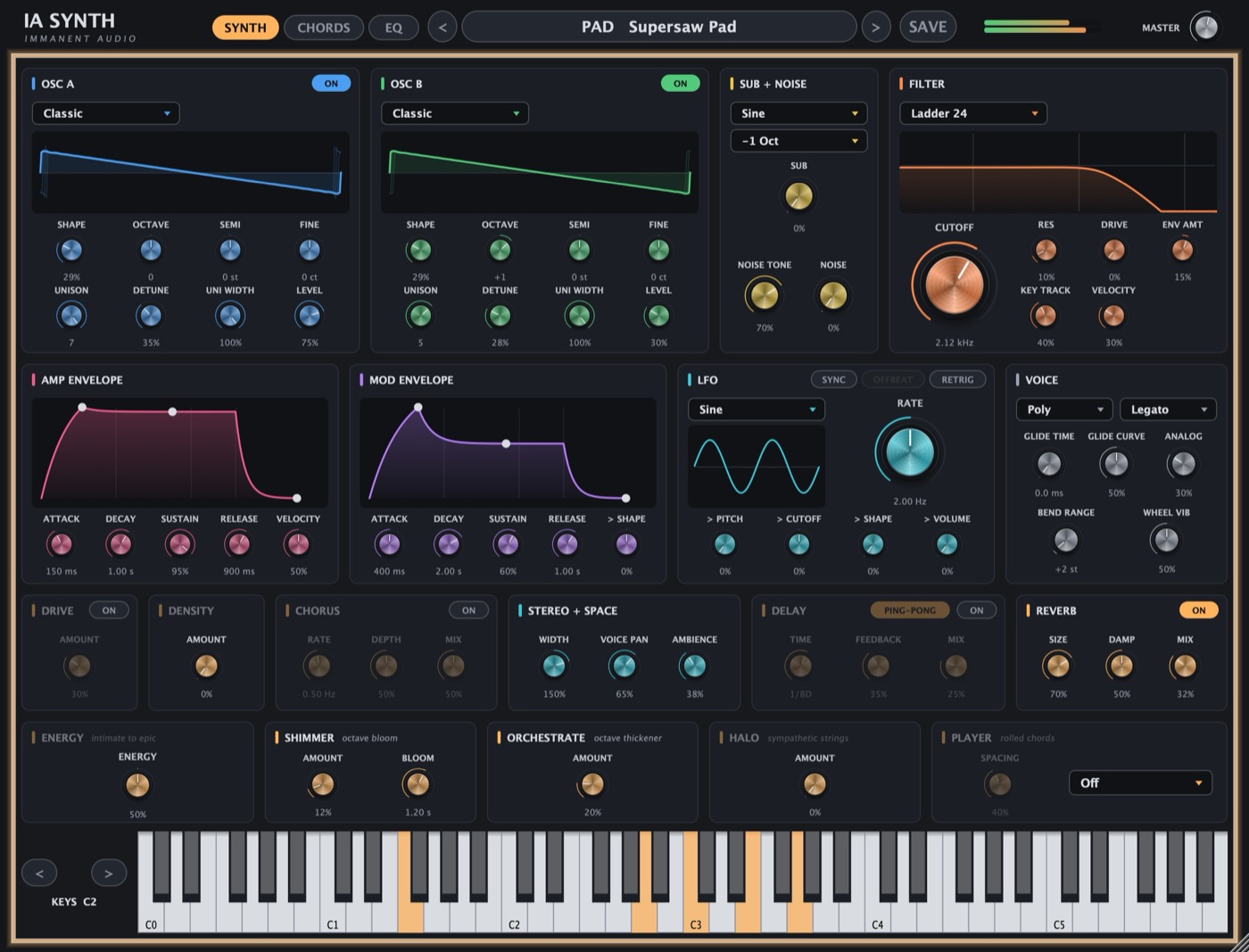
IA Synth is a polyphonic synthesizer with a chord and rhythm studio and a console-style EQ built in. It has three pages, switched with the tabs at the top.
- SYNTH: 120 presets and all the controls.
- CHORDS: genre-specific chord and progression suggestions, a piano roll, rhythm grooves, and MIDI drag-and-drop to your DAW.
- EQ: a 5-band EQ with HPF/LPF and presets.
Getting started
- Insert IA Synth on an instrument track.
- Pick a preset with the arrows or the preset name at the top.
- Play from your keyboard, the on-screen keys, or your computer keyboard.
- Open CHORDS to write a progression and drag into your DAW.
The header

| Control | What it does |
|---|---|
| SYNTH / CHORDS / EQ | Switch pages. |
| < and > | Previous / next preset. |
| Preset name | Click for the full list by category, plus the user presets folder. |
| SAVE | Save the current sound as your own preset. |
| Meter | Output level. |
| MASTER | Output volume, -36 to +12 dB. |
The keyboard

Click to play, or use your computer keyboard. Z and X (or the < and > buttons) move the computer keys down or up an octave.
The SYNTH page
Two oscillators, a sub and noise feed the filter and amp. Effects, stereo tools and the performance controls sit below. Sections that are switched off are dimmed.
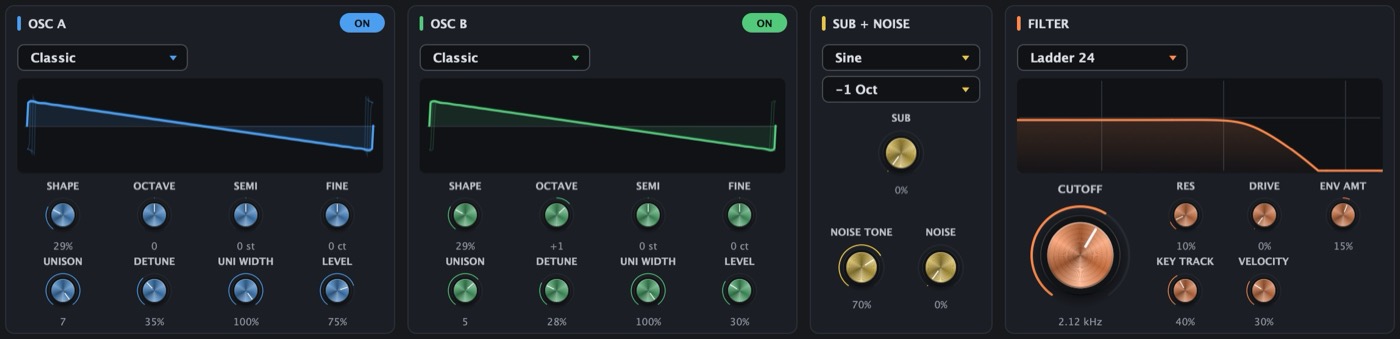
Oscillators (OSC A and OSC B)
| Control | What it does |
|---|---|
| ON | Turns the oscillator on. |
| Wave menu | Six morphing tables: Classic, Mellow, Sync, Organ, Vocal, FM. |
| SHAPE | Sweeps through the table's waveforms. |
| OCTAVE / SEMI / FINE | Tuning: octaves, semitones, cents. |
| UNISON | 1 to 7 stacked copies of the oscillator. |
| DETUNE | How far the copies spread in pitch. |
| UNI WIDTH | How far the copies spread in stereo. |
| LEVEL | Oscillator volume. |
Sub + Noise
| Control | What it does |
|---|---|
| Sub wave / octave | Sine, triangle or square, one or two octaves below the note. |
| SUB | Sub volume. |
| NOISE TONE | Noise brightness. |
| NOISE | Noise volume. |
Filter
| Control | What it does |
|---|---|
| Type | Ladder 24 (warm, classic), Smooth 12, Band Pass, High Pass. |
| CUTOFF | Filter frequency. |
| RES | Resonance. |
| DRIVE | Saturation inside the filter. |
| ENV AMT | How far the mod envelope moves the cutoff, up or down. |
| KEY TRACK | Higher notes open the filter more. |
| VELOCITY | Softer notes play darker. |

Envelopes
| Control | What it does |
|---|---|
| ATTACK / DECAY / SUSTAIN / RELEASE | Shape of the note over time. You can also drag the handles on the display. |
| Amp VELOCITY | How much softer soft notes play. |
| MOD ENVELOPE | A second envelope. It moves the filter (through ENV AMT) and, with > SHAPE, the oscillator shape. |
LFO
| Control | What it does |
|---|---|
| Shape menu | Sine, Triangle, Saw, Square, Random, Pump (sidechain-style duck). |
| RATE | Speed in Hz. With SYNC on it becomes SYNC RATE, in note values. |
| SYNC / RETRIG | Lock to the DAW tempo / restart on each new note. |
| OFFBEAT | Shifts the cycle half a beat. Available with SYNC or RETRIG. |
| > PITCH / > CUTOFF / > SHAPE / > VOLUME | How much the LFO moves each of these. |
Voice
| Control | What it does |
|---|---|
| Poly / Mono / Legato | Chords, one note at a time, or one note without re-triggering. |
| Legato / Always | Glide only between overlapping notes, or on every note. |
| GLIDE TIME / GLIDE CURVE | How long a slide takes and its shape. |
| ANALOG | Subtle per-note drift in tuning and tone. |
| BEND RANGE / WHEEL VIB | Pitch-wheel range / mod-wheel vibrato depth. |

Effects
| Control | What it does |
|---|---|
| DRIVE | Warm saturation. |
| DENSITY | Multiband compression for a fuller, closer sound. |
| CHORUS | Classic ensemble chorus: RATE, DEPTH, MIX. |
| DELAY | Tempo-synced echo: TIME, FEEDBACK, MIX, PING-PONG. |
| REVERB | SIZE, DAMP (darkens the tail), MIX. |
Stereo + Space
| Control | What it does |
|---|---|
| WIDTH | Stereo width. The low end always stays mono. |
| VOICE PAN | Places each voice at its own position. |
| AMBIENCE | A soft room space that fills the gaps between notes. |

Perform
| Control | What it does |
|---|---|
| ENERGY | 50% is the preset as designed. Lower is more intimate, higher is bigger and brighter. |
| SHIMMER / BLOOM | Airy octave layers with their own reverb / how quickly they fade in. |
| ORCHESTRATE | Octave doubles that thicken the sound. |
| HALO | Strings that ring along with the chord. |
| PLAYER | Rolls chords like a strum: Off, Roll Up, Roll Down, Loose. SPACING sets the gap between notes. |
The CHORDS page
Write progressions without leaving the plugin. Everything follows the key, so the whole library works in any key.
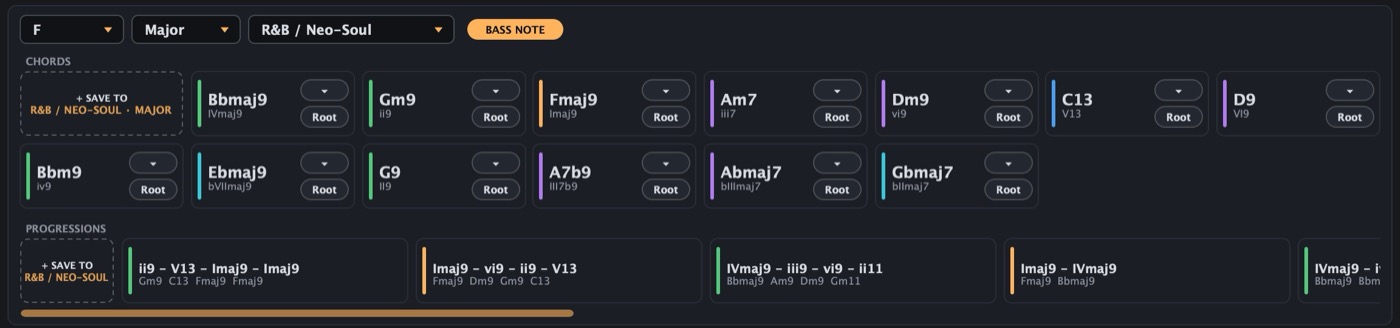
Key, mode and genre
| Control | What it does |
|---|---|
| Key / Major-Minor | The key. |
| Genre | 12 genres, each with their own chords, progressions and grooves. |
| BASS NOTE | Adds the root note in the bass. |
Chords and progressions
| Control | What it does |
|---|---|
| Chord tiles | Hold to hear. The top button picks the chord colour and the lower one the inversion (hover the list to hear each). |
| Progressions | Click to loop a preview; click again to stop. |
| Drag | Drag any tile onto the roll, or straight into your DAW as MIDI. |
| + SAVE | Saves the chord selected in the roll, or the roll's progression, to this genre. Right-click a saved tile to rename or delete it. |
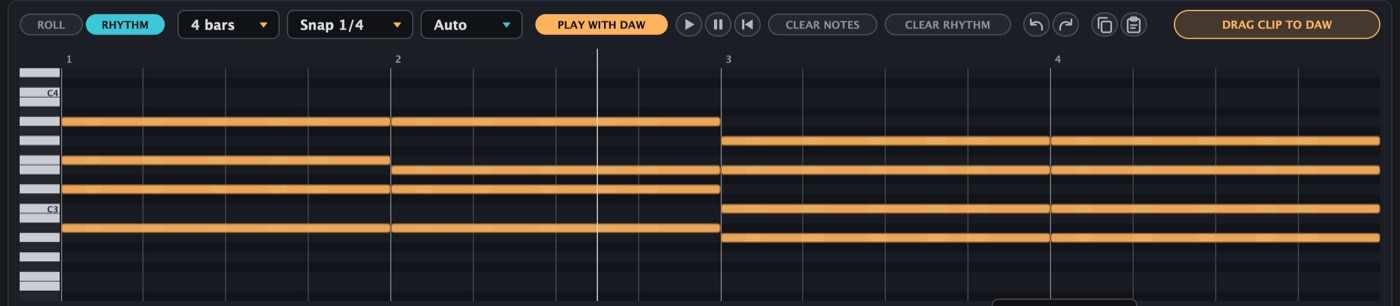
The piano roll
| Control | What it does |
|---|---|
| ROLL / RHYTHM | Show the roll alone, or the rhythm editor under it. |
| Length / Snap | 1 to 16 bars / grid size. |
| Time signature | Auto follows your DAW, or pick one. |
| PLAY WITH DAW | Plays the roll in time whenever the DAW plays. |
| Play / Pause / Back to start | Preview the roll while the DAW is stopped. |
| CLEAR NOTES / CLEAR RHYTHM | Empty the roll / switch the rhythm off. |
| Undo, Redo, Copy, Paste | Also Cmd (Ctrl) Z, C, X, V, and D. |
| DRAG CLIP TO DAW | Drag the whole clip into your DAW as a MIDI item. |
Editing: double-click the grid to add a note (keep holding and drag to set its length), drag a note to move it, drag its right edge to resize, double-click it to delete. Drag on empty grid to select.

Rhythm
| Control | What it does |
|---|---|
| Groove tiles | Click to load a groove for this genre and meter. Click the lit one to turn it off. |
| CHORD / BASS lanes | Click a step to add or remove a hit, drag to hold it, shift-click to accent. |
| Pattern / SWING | One- or two-bar pattern / how much the off-beats lag. |
| + SAVE | Save the grid as your own groove. |
The roll holds the harmony and the rhythm decides when it plays. Each hit plays whatever chord is current at that moment.
Playing with your DAW
- Bar 1 of the clip sits where you press play in the DAW, or on the loop start when the DAW is looping.
- Switching PLAY WITH DAW on mid-song joins at the current position.
- While the roll has notes, the track's own MIDI is muted.
- Once you drag the clip into your DAW, PLAY WITH DAW turns off, so the notes aren't doubled.
The EQ page
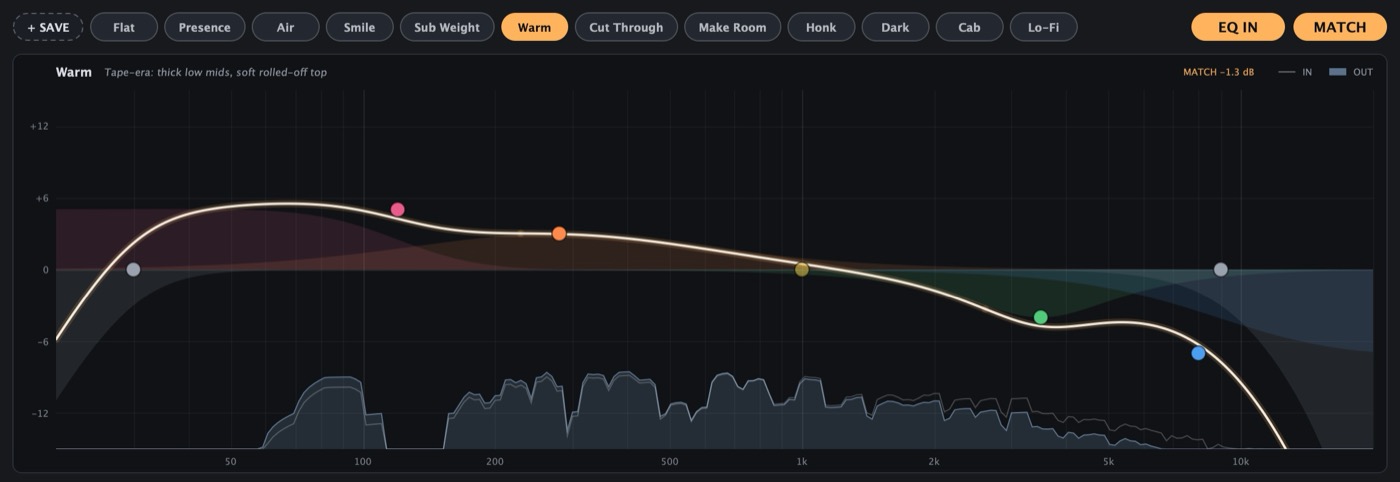
A 5-band EQ on the synth's output (with HPF and LPF). Changing synth presets doesn’t change EQ settings.
Curves
| Control | What it does |
|---|---|
| Curve buttons | 12 preset EQs. |
| + SAVE | Save your own. Right-click it to rename, update or delete. |
| EQ IN | Bypass switch. |
| MATCH | Keeps the loudness level, so you hear the tone change, not a volume jump. |
The display
- Drag a dot to move that band: left and right for frequency, up and down for gain.
- Mouse wheel over a dot changes its width (Q). Double-click a dot to return it to the curve.
- The filled trace is the sound going in; the outline is what comes out.
The bands
| Control | What it does |
|---|---|
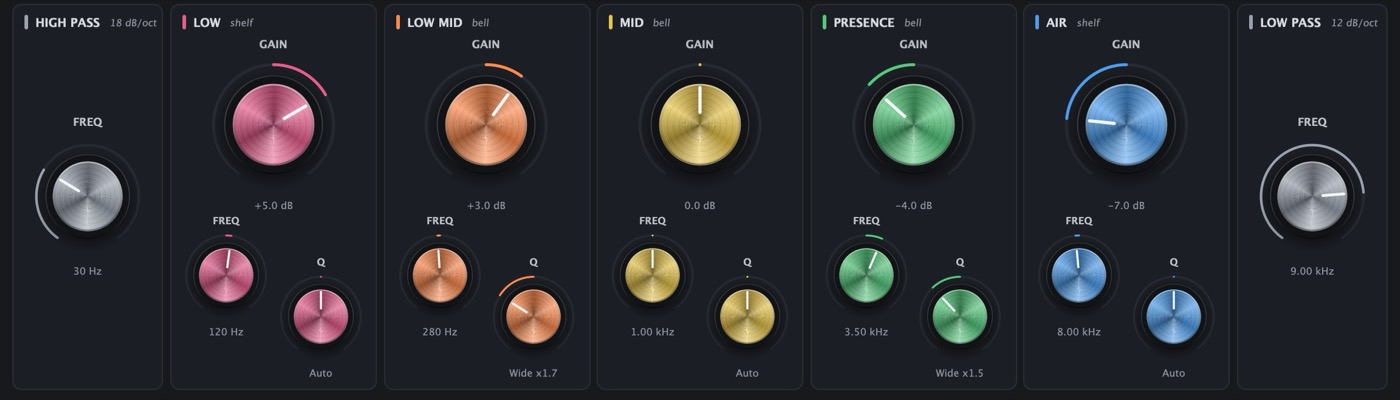
| HIGH PASS | Cuts lows below FREQ (18 dB/oct). Fully left is off. |
| LOW / AIR | Shelves for the bottom and top end. |
| LOW MID / MID / PRESENCE | Bell bands for the low, middle, and high mids. |
| GAIN / FREQ / Q | ±12 dB / band frequency / width. Q centered is Auto and follows the gain. |
| LOW PASS | Cuts highs above FREQ (12 dB/oct). Fully right is off. |
IA Synth is free — VST3 and AU, macOS and Windows. Back to the plugin page.